Tutorials
Study the Organon with the AI Study Assistant
By Dr. Harish Kumar · September 12, 2026 · 6 min read
Read, search and bookmark all 291 aphorisms of the Organon, then use the AI Study Assistant to explain and compare, checking every answer against the source.
The Organon is the book every BHMS student is told to read and very few read closely. HomeopathyWorld gives you two tools that work well together. The first is the full text of all 291 aphorisms, searchable and easy to move through. The second is an AI Study Assistant you can question about what you have just read. This guide covers both, and ends with how to ask questions that get useful answers.
Before you start
- Find the two pages. In the sidebar they are Organon and AI Study Assistant. Both need a free account. A public reading version of the Organon is also open to everyone (see below).
- Know the text. The aphorisms are Hahnemann's Organon of Medicine, 6th edition, in the public-domain Boericke translation.
- Know your allowance. The free plan includes 30 Study Assistant messages a day. The count resets at midnight India time.
Part 1: Reading the Organon
Find an aphorism
The Organon of Medicine page lists all 291 aphorisms in order. Each card shows the aphorism number, its topic, its chapter, the opening lines and a few keywords.
- Use the search box to find aphorisms by their text, topic or keywords. It also matches numbers, so typing 153 brings up §153.
- Use the All chapters menu to show a single chapter.
- Click any card to open that aphorism.
Read an aphorism page
Each aphorism page shows its chapter, the heading "Aphorism §" with its number, its topic, the full text set out as a quotation, and its keywords.
- Moving around. The small buttons at the top right take you to the previous and next aphorism. The Organon button takes you back to the list.
- Commentary. Below the text you may find up to three commentary cards: Explanation, Clinical Interpretation and Modern Context.
- Related Aphorisms. At the bottom, this lists aphorisms on the same theme. It is a good way to read the argument rather than isolated paragraphs.
Many commentaries carry a note that they are an AI-generated draft awaiting review by a homeopath. The aphorism text itself is always the verbatim translation. Treat the commentary as a study aid, and let the text have the last word.
Bookmark what matters
Press Bookmark on any aphorism page. The button changes to Saved, and pressing it again removes the bookmark. Everything you save collects on the Bookmarks page at /bookmarks, newest first, with a count of saved items.
Tip: bookmark as you revise, not afterwards. Before an exam, your Bookmarks page becomes a ready-made list of the aphorisms you found hardest.
The free Organon pages
You can read the Organon without an account at /organon-of-medicine. All 291 aphorisms are listed by chapter, and each has its own page with the full text and links to related aphorisms. On the public pages, commentary appears only once a homeopath has reviewed it; otherwise the page says it is coming soon. These pages are ideal for sending a classmate a link to a single aphorism.
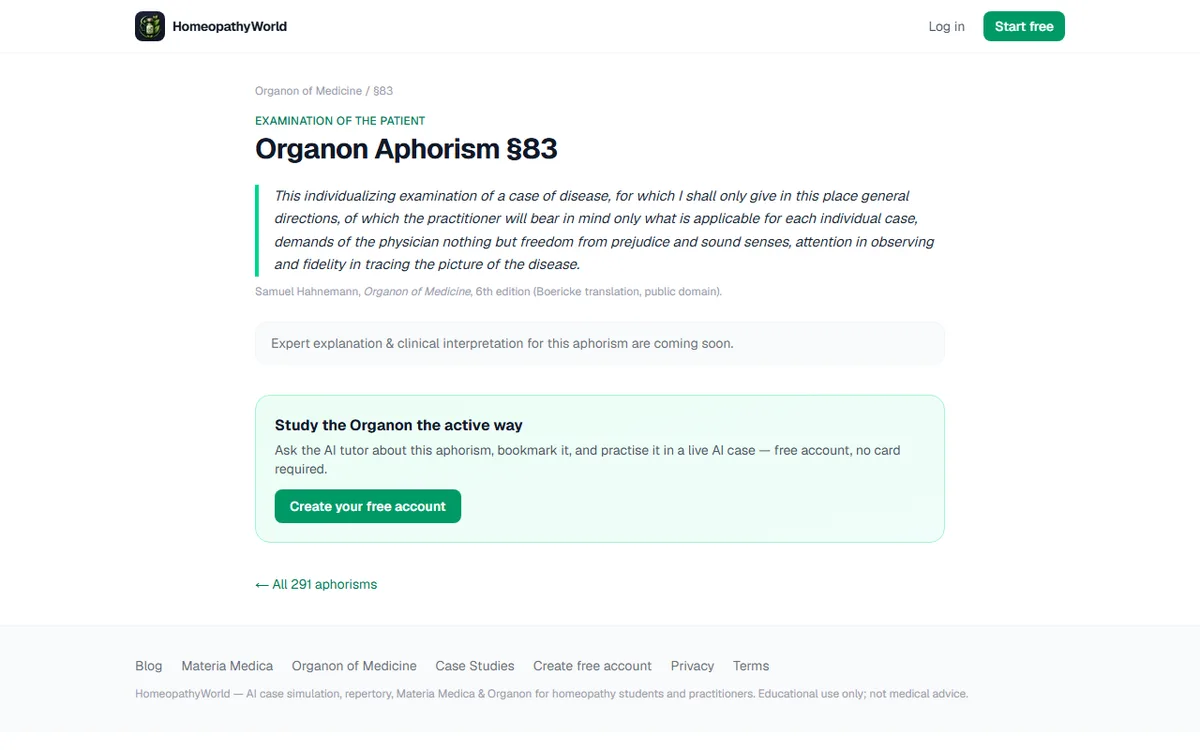
Screenshot of the free public page for §83 (homeopathyworld.in/organon-of-medicine/aphorism-83), 13 September 2026.
Two articles put particular aphorisms to work: The fundamental cause in §5 and The minimum dose is a method.
Part 2: The AI Study Assistant
The starting screen
Open AI Study Assistant and you will see a greeting, a row of topic chips and a set of starter questions.
- Topic chips. All Topics, Organon, Materia Medica, Miasms, Clinical and Repertory filter the starter cards.
- Starter cards. These include Organon §1, Compare Pulsatilla & Silica, Psora miasm, Potency selection, Sulphur keynotes, Repertorisation steps, Sycosis vs Syphilis and Acute vs Chronic.
Tapping a card sends its question straight away, so it uses one of your messages.
Asking and following up
Type into the box at the bottom and press Enter to send. Shift and Enter together start a new line. The answer streams in as it is written.
Follow-up questions in the same chat carry the conversation with them. So "now give me a clinical example" works without repeating yourself.
Under the box is a line worth reading every time: AI can make mistakes, so always verify clinical information with qualified teachers.
Chat history
Your chats are saved automatically. Each one is titled with its first question.
- Open your history. The clock icon at the top right opens the Chat History drawer. Pinned chats sit under Pinned and the rest under Recent. Tap any chat to reopen it.
- Pin or delete. Hover over a chat and open its three-dot menu to Pin (or Unpin) or Delete it. Delete takes effect straight away with no confirmation and no undo, so pin the chats you want to keep before tidying up.
- Start fresh. New Chat in the drawer, or the plus icon in the top bar, starts a new conversation. The back arrow returns you to the starting screen.
Your daily allowance
On the free plan you have 30 messages a day. Every question counts, including starter cards. AI Semantic Search in the Materia Medica library draws on the same allowance.
When you reach the limit, the reply tells you that the daily limit has been reached. The count resets at midnight India time. Practitioner Pro raises the allowance.
How to ask good questions
The Assistant answers the question you ask, so the quality of your question decides the quality of the answer. A few patterns work well:
| Instead of | Ask |
|---|---|
| "Explain the Organon" | "Explain §26 in plain English, then give one clinical example of it" |
| "Tell me about Bryonia" | "Compare Bryonia and Rhus tox for joint pain: modalities, thirst and mental state, as a table" |
| "What is psora?" | "Explain how Hahnemann describes psora, and which aphorisms I should read on it" |
| "Help me revise" | "Ask me five short questions on §§1–10, one at a time, and correct my answers" |
Some general rules:
- Be specific. Name the aphorism number, the remedies, or the chapter.
- Ask for comparisons. Differential study is where the Assistant saves you the most time, because it lays two pictures side by side.
- Ask for structure. Tables, numbered points and short summaries are easier to check than long paragraphs.
- Then check the source. Open the aphorism in the Organon, or the remedies in the Materia Medica library, and read what the book actually says. If the answer and the text disagree, the text wins, and you have learned something about both.
A 20-minute study routine
- Read three consecutive aphorisms on the Organon page.
- Ask the Assistant to explain the hardest of the three in plain English.
- Compare its answer against the text and the commentary cards.
- Bookmark the aphorism if it still feels unclear, and note your question.
- Finish by asking the Assistant to quiz you on all three.
Common mistakes
- Letting the Assistant replace the book. It is a tutor to question, not a source to cite in an exam.
- Asking vague questions. They produce vague answers and burn through your daily messages.
- Deleting chats in a hurry. There is no undo.
- Reading the commentary instead of the aphorism. The commentary helps, but only the aphorism is Hahnemann.
Try it now
Open the Organon, read §1 to §3, then open the AI Study Assistant and ask it to explain §2 with a clinical example.
Next in this series
Dr. Harish Kumar
Homeopath and founder of HomeopathyWorld. Writes on materia medica, case-taking, repertory and the Organon for students and practitioners.
Put this into practice
Repertorise these symptoms against the real Kent & Bönninghausen, read the full Materia Medica, and practise the case on an AI patient — free account, no card required.
Create your free accountMore in Tutorials
Discussion
Sign in to join the discussion.
No comments yet — start the conversation.