
Tutorials
The Materia Medica Library: Six Classic Books in One Place
By Dr. Harish Kumar · September 21, 2026 · 8 min read
How to browse six classic Materia Medica texts, find any remedy quickly, search every word of every book, cite and save passages, and read one remedy across every book.
Every BHMS student ends up with a shelf of Materia Medica books and a habit of reading only one of them. The library on HomeopathyWorld puts six classic texts side by side, whole, so that you can read what Boericke, Kent and Allen each said about a remedy, search every word of them at once, and cite the passage you used. This guide shows you how. Updated 15 September 2026 for the September update.
Before you start
- Find the library. In the sidebar it is Materia Medica, and the page is headed Materia Medica Literature Library. You need a free account to use it.
- Know what is inside. Six classic books: Boger's Synoptic Key, Allen's Keynotes (the 1910 edition), Farrington's Clinical Materia Medica, Tyler's Homoeopathic Drug Pictures, Boericke's Homoeopathic Materia Medica and Kent's Lectures on Homoeopathic Materia Medica. The line under the page title shows the current counts; on 15 September 2026 it read 6 classic texts, 704 remedies and 8,443 entries.
- Know the three ways in. Browse by book, find a remedy by name, or search the words of every book at once.
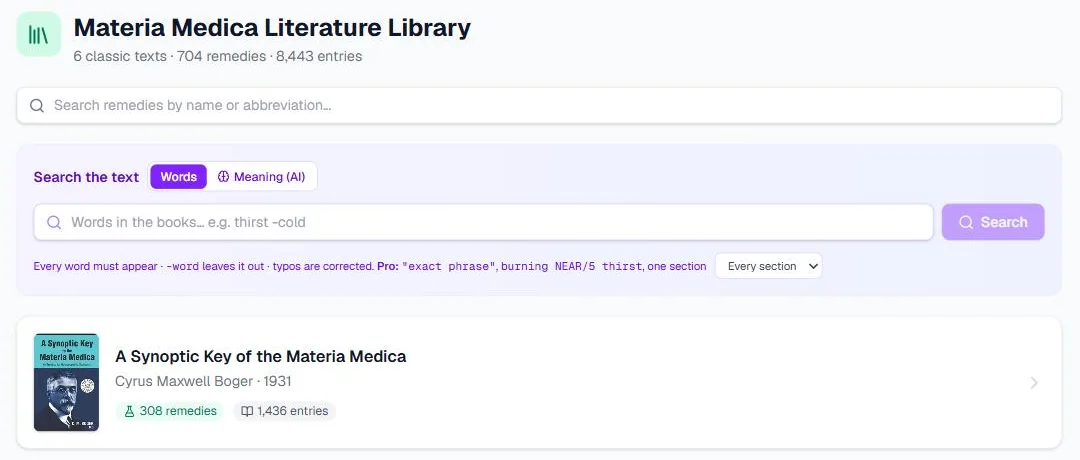
The library's opening screen on our own account, 14 September 2026.
Step 1: Browse by book
The opening screen lists the six books. Each one shows its author, year, and how many remedies and entries it holds.
- Click a book to open it. You now see only the remedies that book covers.
- Use the A–Z strip to jump to a letter. Greyed-out letters have no remedies in that book. Press Clear to remove the letter filter.
- Change the order with the sort menu: Name (A–Z), Name (Z–A) or Most sources.
- Switch between the grid and list layouts with the two buttons beside the sort menu. The grid shows a short description for each remedy, while the list fits more on the screen.
- Results come 60 to a page. Use Previous and Next at the bottom.
- Press All books to go back to the book list.
Each remedy card shows its abbreviation, its kingdom, its name and its full Latin name. Small badges show which books cover it, by the author's surname.
Tip: sort by Most sources when you are revising. The remedies covered by the most books come first. These are usually the polychrests your examiners expect you to know best.
Step 2: Find a remedy by name
The box at the top, Search remedies by name or abbreviation…, finds remedies by name. It knows the usual abbreviations and older names, so "nat-m" finds Natrum muriaticum and "nux-v" finds Nux vomica. The results line tells you how many remedies matched.
This box searches names only. To look for a symptom, use the text search in Step 3.
Step 3: Search the words of every book
The Search the text panel has two modes. Words, the default, looks for the words themselves in every book at once.
- Type the words of the symptom, for example
thirst small quantities, and press Search. - Every word must appear in a passage. Put a minus sign before a word to leave it out, as in
thirst -cold. - Typos are corrected, and the search says so: "thrist" is searched as thirst.
- Each result is one remedy in one book, with the section, the number of hits and your words highlighted. Click a result to open that remedy.
Inside a book, the panel searches only that book. Tick Search every book to widen it again.
Exact phrases in quotes, burning NEAR/5 thirst for words that sit close together, and a search limited to one section are free for everyone while we preview them. They become part of Practitioner Pro later — anything you save stays yours.
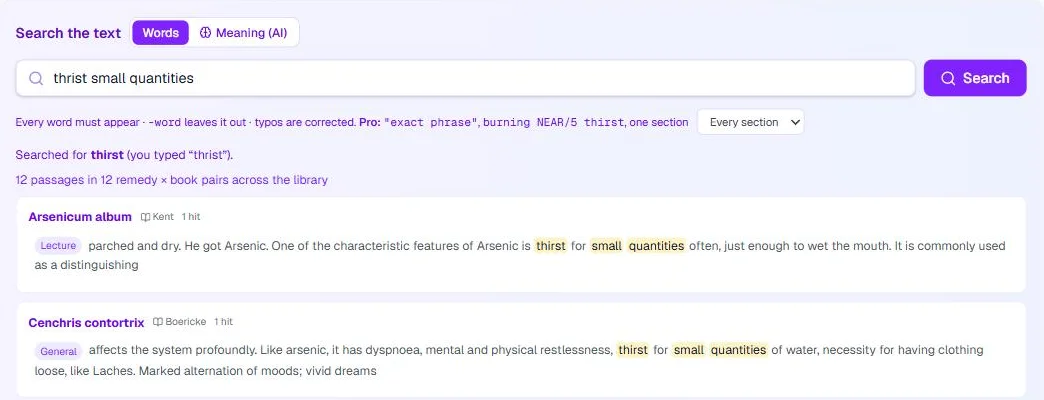
A Words search, 14 September 2026.
Step 4: Search by meaning with AI
Switch the panel to Meaning (AI) for the moment every student knows: you remember the symptom but not how the books phrase it.
- Describe the symptom in plain words, as the patient might say it, for example "burning pain worse at night" or "fear of the dark, wants company".
- Press Search. You get up to twelve passages that read like your description, each with the remedy, the book and the section.
- If nothing is close enough, it says "No passage matches that closely enough" rather than guessing.
A few things to know before you rely on it:
- It has its own daily allowance: 60 searches on the free plan and 300 on Practitioner Pro, reset at midnight India time. It does not use the Study Assistant's allowance.
- It matches meaning, not exact words. Phrase the symptom the way the old books would, with its modality ("worse", "better", "at night"), and the results improve.
- It is a pointer, not a repertorisation. It finds passages that read like your description. It does not weigh one symptom against another. For a real case, use the repertory and bring the shortlist back here to read.
Step 5: Take your words to the repertory
Under the Words results, press Find repertory rubrics for these words. You get the repertory rubrics that contain every word you searched, each with its repertory and its number of remedies. Tick the rubrics that fit your patient and press Add to the repertory basket. The repertory opens with them in Selected Rubrics.
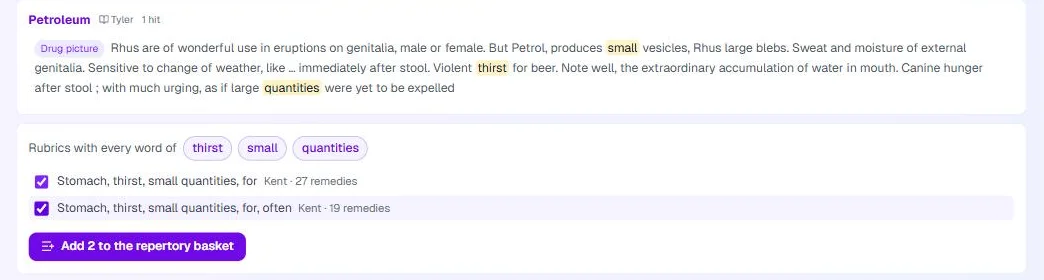
Rubrics for "thirst small quantities", 14 September 2026.
Step 6: Read a remedy page
Open any remedy and you get its full page:
- The header shows the name, abbreviation, Latin and common names, the kingdom and family, and a Facts line citing the page they come from, such as "Allen, Keynotes (1910), p. 259".
- The lead is a short description, with Read on to jump to the passage it comes from.
- The book chips let you read every book (All books) or just one. By book is the normal layout; By section lays the books side by side by topic. Compare opens two or more remedies side by side, and Print gives a clean copy of the page with every book. By section, Compare and Print are free for everyone.
- Relationships lists complementary remedies, remedies that follow well, antidotes, inimicals, compatible and related remedies, each marked with the book it comes from.
- Contents lists every book on the page with links to its sections. Kent and Farrington wrote lectures, so each lecture is one link.
- The books follow, each whole. Every heading gives the author, when the text was last updated, and notes that help you read it, such as "Words in capitals are Boger's highest grade".
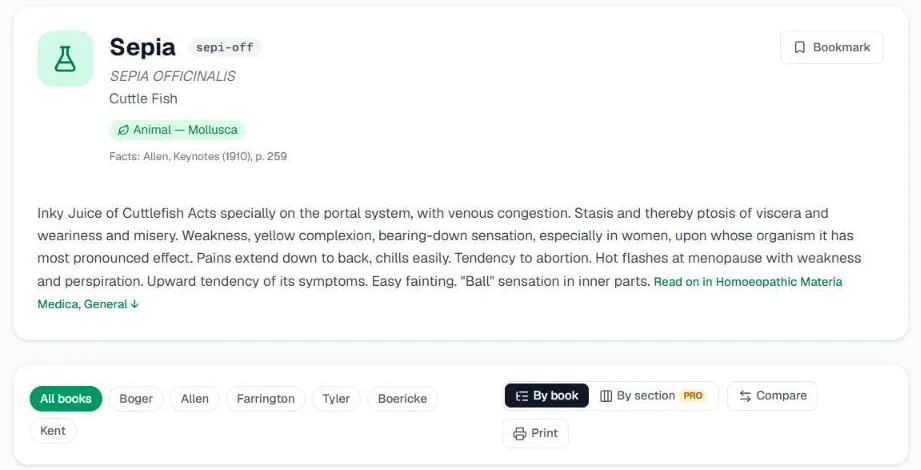
The top of the Sepia page, 14 September 2026.
This is where the library earns its place. Read the Mind section in Boericke, then the same topic in Kent's lecture, and notice what each author chose to stress.
Reading one book or all of them
When you open a remedy from inside a book, the page starts on that book: its chip is selected, and the back link at the top carries the book's title. Press All books to read the others. When you open a remedy from the name search, you see every book that covers it.
Cite a passage
Every passage has Cite. It opens a ready-made reference, with the author, book, year, section and a link back to the passage, and a Copy button. The text is selectable too, in case your browser blocks copying.
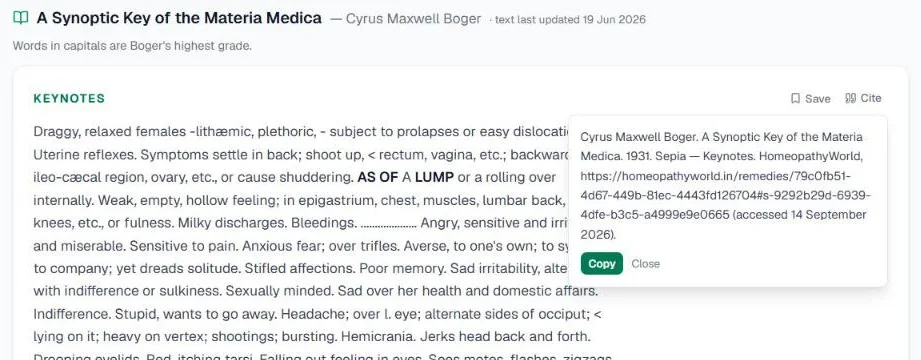
A citation on the Sepia page, 14 September 2026.
Arriving from the repertory
When you open a remedy from a repertorisation, the remedy panel's Materia Medica tab starts with Your rubrics in its books: for each of your rubrics, where this remedy's books speak of the symptom. Below that it links to one book at a time, or to View All Books, and Full Detail opens the complete page. The button at the top then reads Back to Analysis and takes you straight back to your grid.
Bookmarks, highlights and notes
Every passage has a Save button. Saved passages collect on the Bookmarks page at /bookmarks, under Materia Medica passages, next to any Organon aphorisms you have bookmarked.
You can also highlight words in a passage and keep your own notes beside them — free for everyone while we preview it, and part of Practitioner Pro later. Bookmarks can export them as W3C Web Annotations, and anything you save stays yours either way.
The free Materia Medica pages
You do not need an account to read the public-domain books. The public Materia Medica pages list remedies from A to Z, and each one shows every public-domain book in full, with contents, a Where each author writes table and a citation for each passage. Tyler's Homoeopathic Drug Pictures stays inside the library for members, as do the text search, saving and the link to the repertory.
They are useful for a quick look on the bus, or for sending a link to a classmate.
Common mistakes
- Reading only one author. Each book has its own emphasis. Allen's Keynotes is short and sharp, while Kent's lectures are full portraits. Read at least two authors for any remedy you want to know.
- Typing symptoms into the name search. It searches names only. Use Search the text.
- Treating search results as a diagnosis. They are passages that contain or resemble your words, and nothing more.
- Memorising lists instead of pictures. See How to memorise Materia Medica for a method that lasts.
Try it now
Open the Materia Medica library, search the words of a symptom you met this week, and read the first remedy in two different books. Or browse the free Materia Medica pages without signing in.
Next in this series
Dr. Harish Kumar
Homeopath and founder of HomeopathyWorld. Writes on materia medica, case-taking, repertory and the Organon for students and practitioners.
Put this into practice
Repertorise these symptoms against the real Kent & Bönninghausen, read the full Materia Medica, and practise the case on an AI patient — free account, no card required.
Create your free accountMore in Tutorials
Discussion
Sign in to join the discussion.
No comments yet — start the conversation.