
Tutorials
Understanding your case score in the Case Simulator
By Dr. Harish Kumar · September 12, 2026 · 9 min read
What each part of your Practice score means, how to read the point-by-point breakdown, and how to turn it into better case-taking next time.
You have finished a case and there is a number on the screen. This guide explains what that number measures and what it does not. It covers where the detail behind it lives and how to use the feedback so your next case-taking is better. It is written for BHMS students, but anyone using the simulator will find it useful.
Before you start
- You need at least one completed case. If you have not taken one yet, start with Your first case in the AI Case Simulator.
- A practice case's score is labelled Practice score. (An exam station's reads Advisory score · not signed off until faculty sign it off; see the exam guide.) It is a learning aid, not an official grade. The answer keys the cases are checked against are still being signed off by homeopath reviewers, and the label will stay until that work is done and the scores have proved reliable.
- Only English cases receive a number for now. Cases in the other seven languages receive feedback marked "Unscored" (see the end of this guide).
Reading the score card
The score card appears on the right of the case screen as soon as you finish. On a phone it sits in the Analysis tab, and that tab then reads Score followed by your number.
- The header reads Practice score, with your total out of 100, a one-line verdict and the remedy and potency you prescribed.
- Case-taking, Rubric selection and Remedy fit each show a percentage with a short note. The case-taking line matters most while you learn: it reflects how much of the patient's story you drew out.
- What you did well lists your strengths. Read it, because it tells you what to keep doing.
- Work on next time lists concrete gaps. Pick one of them for your next case.
- Remedies to consider names other remedies, each with a reason. Treat these as differentials to study in the Materia Medica, not as a verdict that your prescription was wrong.
- A shaded box at the bottom gives one teaching point from the case.
Underneath are three buttons: Why this score, Review chat and Done. You can reopen any finished case later from Recent Sessions on the Cases page by tapping View.
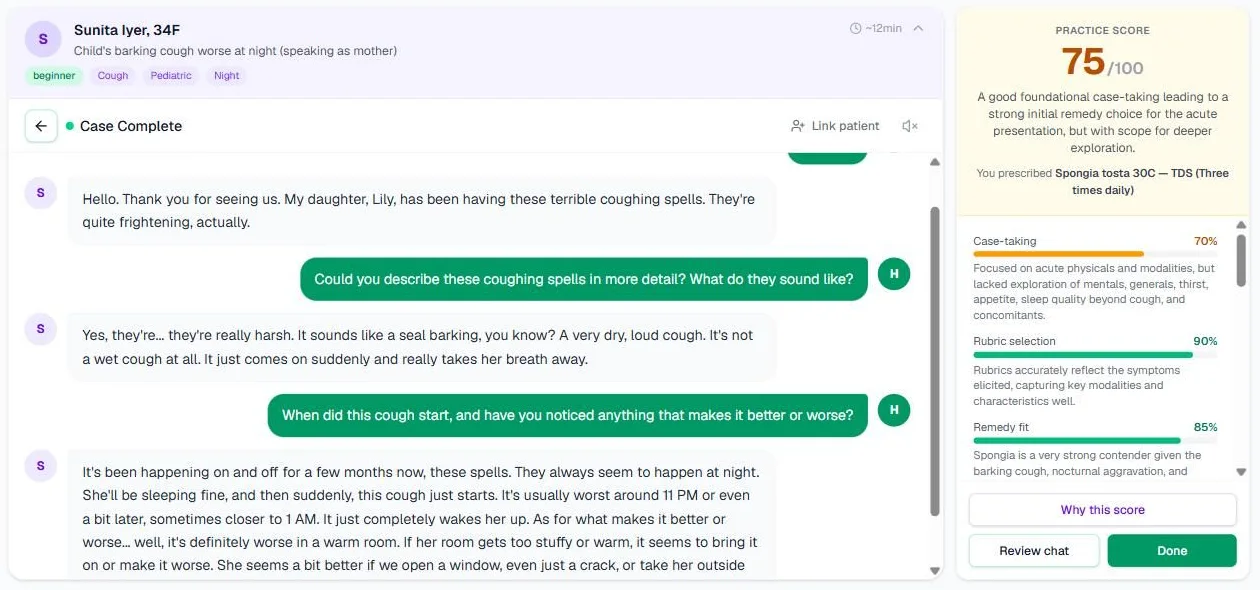
Screenshot from our own account, 13 September 2026, of a practice case finished in June: a child's barking cough, prescribed Spongia tosta 30C. The card scrolls; What you did well and the sections after it sit below the three sub-scores. The patient is simulated.
The coverage meter during a case
While you take a Learning-mode case that has an answer key, the Coverage panel sits above the right-hand tabs. It lists the areas of the case and shows "X of Y areas". An area gets a tick when the patient's answer gives real information about it.
A few things are worth knowing:
- It judges the patient's answers, not the words you type. A question that merely mentions a topic does not tick it. The answer has to contain something real.
- It updates after each reply, and a small spinner shows while it checks.
- It shows area names only. In the words of the panel itself, it never shows what the patient should say.
- A tick means the patient told you something in that area. It does not mean you have exhausted it, so keep asking where the case needs depth.
- It does not appear in Exam mode, or in a case without an answer key.
The Before you begin card at the start of a case lists the same areas under "You are marked on what you draw out in these areas:". It also shows how the answer key splits the points: case-taking 50, rubrics 30, remedy 20.
Why this score
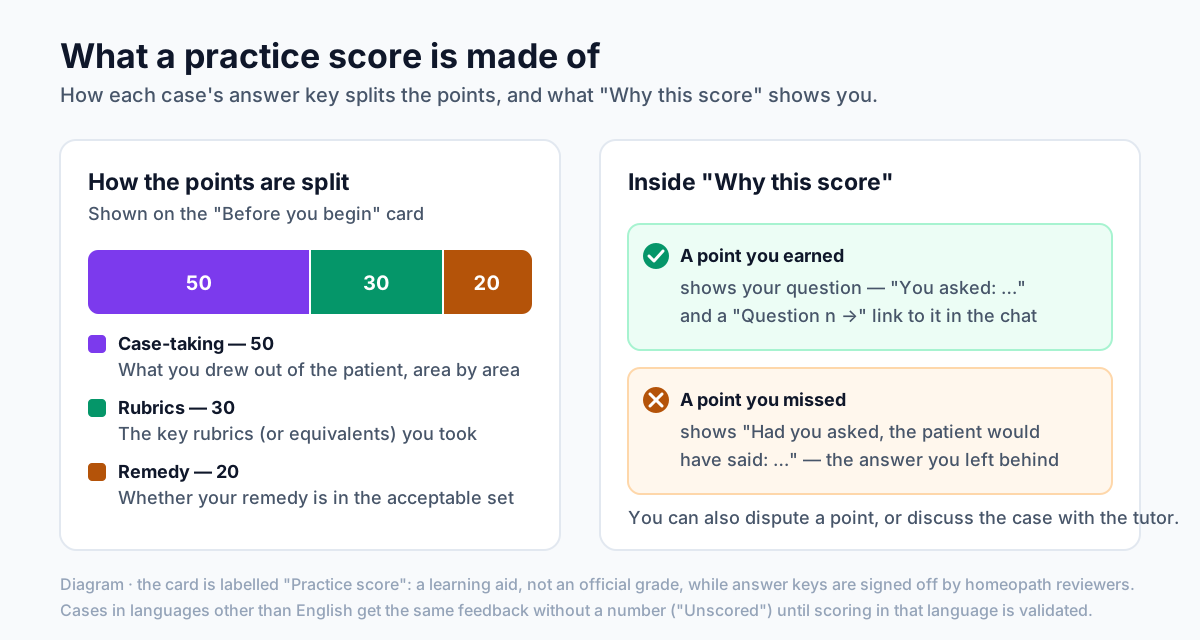
Diagram: how the points are split, and what the breakdown shows for points you earned and points you missed.
Tap Why this score to open the breakdown. A badge beside the title reads Practice (or Unscored). If the case has an answer key, there are two tabs: Breakdown and Discuss this case.
The breakdown can take a moment to prepare. You may see "Checking each point against your transcript…". If it takes longer than usual, close it and open it again a minute later.
What the breakdown shows
- A draft-key notice. While a case's answer key is still an unsigned draft, a notice says so. Read the breakdown as practice guidance.
- Where the number came from. At present your number comes from the examiner, and the checklist comes from a second, evidence-based scorer being tested beside it. That is why you see what you drew out and what you missed without a second number.
- Your own rating. Your self-assessment is shown next to the checklist result, for example the number of case-taking points found out of the total. The gap between how you felt and what you actually drew out is often the most useful line on the page.
- Case-taking. Points are grouped by area. Each point shows its weight and the Organon aphorism it rests on. A point you earned shows the question that earned it, as "You asked: …", with a link such as Question 4 →. The link closes the breakdown and scrolls the chat to that question, highlighted. A point you missed shows "Had you asked, the patient would have said: …".
- Rubrics. A tick marks each key rubric you took, including "an equivalent rubric" where yours matched in substance. "Not taken:" lists the ones you missed. Any of your rubrics the key does not list are shown too. That is not wrong in itself, because the key only lists the rubrics it expects.
- Remedy. You are told whether your prescription is in the key's acceptable set, and the set is listed. More than one remedy can fit a case.
The best use of the breakdown: find the two missed points with the most weight, read what the patient would have said, and ask yourself which question would have drawn it out. Then take the same case again.
Older cases and cases without a breakdown
Some cases have no checklist:
- Older cases show "No point-by-point breakdown was recorded for this score (cases scored before breakdowns existed have none)." Your score and feedback still stand, and you can still dispute the score.
- Cases without an answer key show that there is no answer key yet, so there is no point-by-point breakdown. You can still dispute these too.
Disputing a score
If you think something was marked wrongly:
- At the bottom of the breakdown, tap Dispute this score.
- Under "Which parts?", tick Case-taking, Rubrics, Remedy or Feedback. You can also tap the flag next to any individual point you think was marked wrongly.
- Under "What do you think was marked wrongly, and why?", explain your case in a sentence or two. The send button stays inactive until you have written at least a short sentence.
- Tap Send to a reviewer.
What happens next: the section changes to Your dispute and shows the date it was sent. A faculty reviewer reads your transcript and decides. The decision appears in the same place, marked Upheld or Not upheld, with the reviewer's name and explanation. Settled disputes also help the team check the scorer. A settled dispute is added, without your name, to the set used for that check only if you allow it in Settings → Privacy.
Discuss this case
The Discuss this case tab opens a tutor that knows the case's answer key. It explains, and it does not change your score. You can start from one of three ready questions, such as "Which areas did I miss, and why do they matter?", or type your own in "Ask about this case…".
The tutor uses your daily AI assistant allowance, the same one the Study Assistant draws on. On the Free plan that allowance is 30 a day. The tab appears only for cases that have an answer key.
Your case-taking profile, Practise next and Mastered
Once you have completed cases with a point-by-point breakdown, the Cases page shows Your case-taking profile. The line under it reads "From N scored cases · practice scores, not an assessment".
- What you draw out, by area (weakest first). A bar for each area pools your results across cases. Your weakest area sits at the top.
- Practise next. This suggests an unmastered case that leans hardest on your weakest area. Start this case starts it, and it counts as one of your daily cases.
- Mastery. A case is mastered when you draw out 80% of its case-taking points in 2 attempts in a row. Mastered cases carry a Mastered badge, in the profile and on their Case Library card. Other cases show your last result on their Case Library card; your profile also shows how many attempts you have made.
Repeating a case is not cheating. Deliberate repetition until your questioning holds up is exactly what the mastery rule rewards.
Unscored languages
A case taken in Hindi, Marathi, Tamil, Telugu, Kannada, Bengali or Gujarati gets full feedback but no number. The card is headed Feedback · unscored and explains that scoring in that language has not been validated yet. The sub-score notes remain but the percentage bars are hidden. The breakdown carries an Unscored badge and lists what you drew out and what you missed. Numbers will be switched on for a language once scoring in it has been checked against homeopath reviewers.
Common mistakes
- Chasing the number. A higher total on a draft key matters less than one missed area you now know to ask about.
- Reading "Remedies to consider" as the answer. They are differentials to study.
- Skipping your own rating. Comparing it with the checklist is where self-awareness grows.
- Disputing without evidence. Quote the question you asked and what the patient said. Reviewers decide on the transcript.
Try it now
Open the case simulator, reopen your last finished case from Recent Sessions, and read Why this score from top to bottom.
Next in this series
Dr. Harish Kumar
Homeopath and founder of HomeopathyWorld. Writes on materia medica, case-taking, repertory and the Organon for students and practitioners.
Put this into practice
Repertorise these symptoms against the real Kent & Bönninghausen, read the full Materia Medica, and practise the case on an AI patient — free account, no card required.
Create your free accountMore in Tutorials
Discussion
Sign in to join the discussion.
No comments yet — start the conversation.