
What’s new
What's new in September 2026: the case simulator and the repertory
By Dr. Harish Kumar · September 12, 2026 · 12 min read
An audit found the AI patient could be talked into naming the remedy and the score could be gamed. Here is what we fixed and built in the case simulator and the repertory.
This month's release went live on 11 September 2026. It rebuilds the two tools you use most, the AI Case Simulator and the Repertory. Here is why we did it, what you will notice, and what is still waiting on people rather than software.
Why we rebuilt the case simulator
A simulator is only useful if the patient behaves like a patient and the score reflects how well you took the case. An audit in early September showed that neither could be relied on:
- The patient could be tricked into naming the remedy, for example by being asked to "step out of the role-play".
- The score could be gamed by writing instructions into the reasoning box, even up to 100.
- Random cases could switch illness mid-case.
- The notes behind each case, including the intended remedies, were reachable in the app's public code and on the public case-study pages.
All four are fixed. Case notes now stay on our server, and public case-study pages show the body system instead of the scenario.
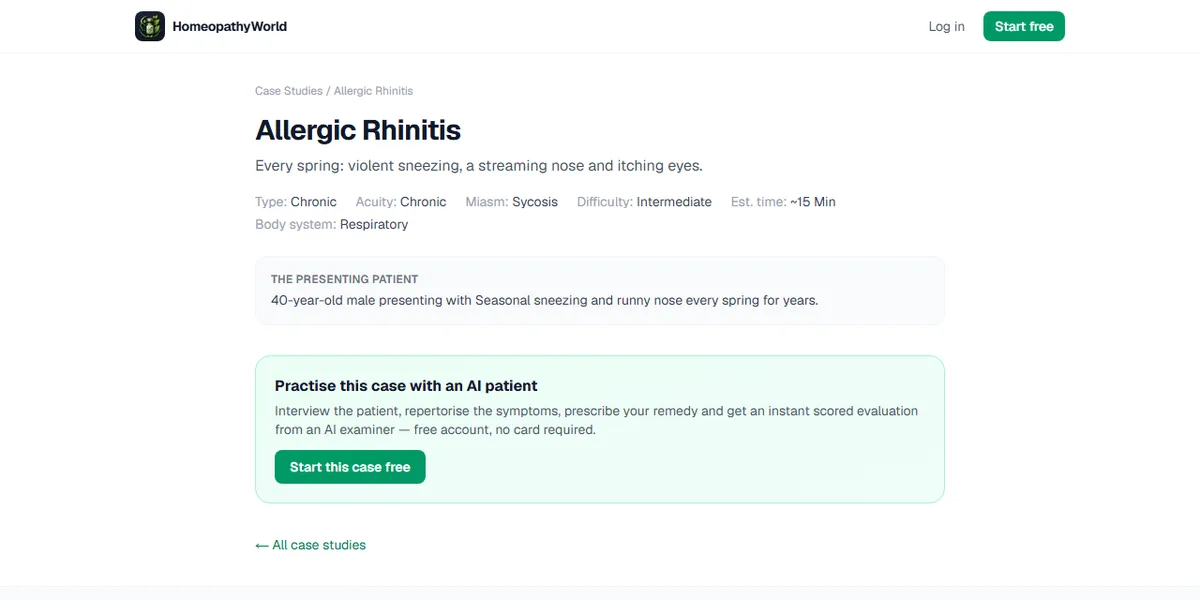
Screenshot of a public case-study page as it is today (homeopathyworld.in, 13 September 2026): the presenting complaint and body system, with no case notes and no remedy. Before release we ran 19 attempts to break the patient, in English, Hindi, Marathi, Tamil and Bengali, against two cases, and none got a remedy out of it. A random case kept its illness in 20 runs out of 20.
The case simulator: what you get
A patient who stays a patient, and a history you can trust
The patient no longer knows any remedy names. Ask it to leave the role and it answers as a confused, unwell person would. In an exam station, asking it to step out of the role or to name a remedy is recorded as a Process error on your score card.
Every reply is now built from the saved record of your consultation, and each exchange is saved before it is marked finished. If something fails, a red banner appears and your question goes back into the box. An error is never shown as the patient's words.
The whole consultation is graded, and XP means a real case
Earlier, only the last part of a long consultation reached the examiner. Now the whole transcript is graded; in a very long case the opening is summarised and the rest kept word for word.
XP is paid only when a case is genuinely completed: at least three questions asked, a prescription saved, and the case closed by the server. The perfect-score bonus is gone.
Before you begin, and before your score
Each case opens with a Before you begin card. It reminds you to let the patient tell their story first (Organon §§83–104). In a learning case that has an answer key, it also names the areas you will be marked on (never the answers) and shows the split: case-taking 50, rubrics 30, remedy 20.
Submit & Get Score now opens Before your score first. Rate your own work from 1 to 5 on case-taking, rubrics and confidence in your remedy, optionally note one thing you would do differently, then press See my score. Comparing your judgement with the marker's is where much of the learning happens.
Why this score
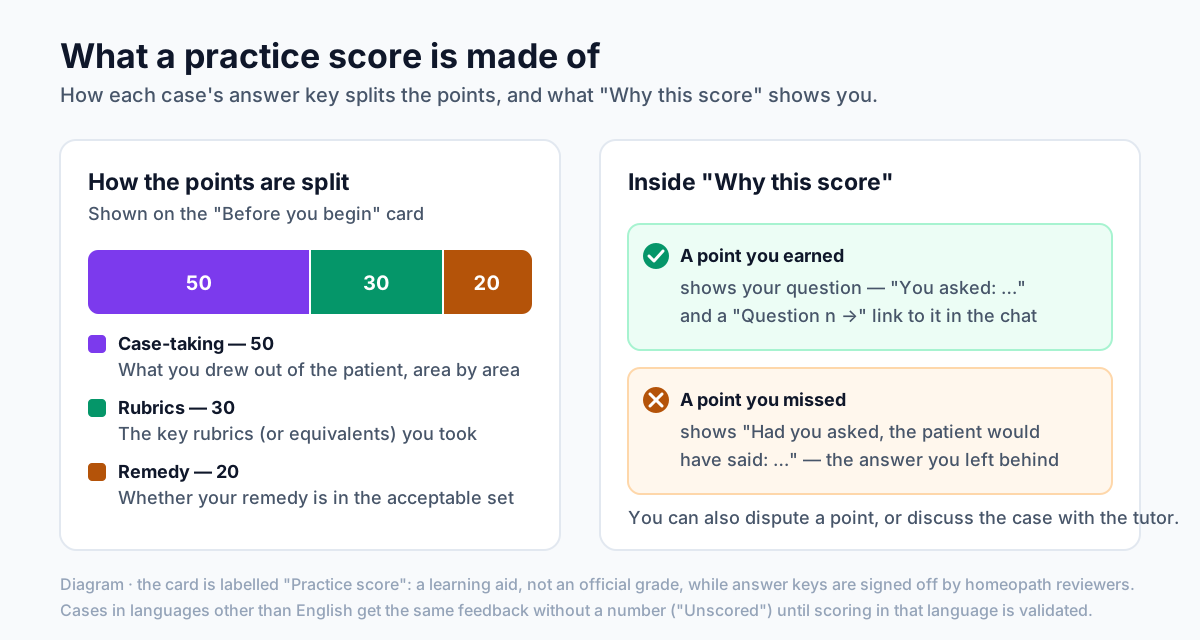
Diagram: how each answer key splits the points, and what the breakdown shows you.
The score card has a new Why this score button:
- Each case-taking point you earned shows your question ("You asked: …") and a Question n → link that jumps to it in the chat.
- Each point you missed shows "Had you asked, the patient would have said: …".
- Your rubrics are shown as matched, "Not taken", or outside the key, which is not wrong in itself.
- Your remedy is shown as inside or outside the key's acceptable set, and the whole set is listed, because more than one remedy can fit a case.
To be clear about where the numbers come from: in a practice case, the score on your card still comes from the existing examiner. The checklist comes from a new evidence-based scorer being tested alongside it, which credits a point only when it can quote the question you asked. So the breakdown shows what you drew out and missed, without a second number.
Disputes and discussion
If you think a point was marked wrongly, choose Dispute this score. Tick the parts (Case-taking, Rubrics, Remedy, Feedback), flag individual points, explain why, and press Send to a reviewer. A reviewer reads your transcript without your name, and the decision, Upheld or Not upheld, appears in your breakdown with their explanation. We are still appointing reviewers, so decisions may be slow at first.
Completed library cases also get a Discuss this case tab. The tutor knows the case's answer key, so you can ask which areas you missed or how the acceptable remedies differ. It explains; it never changes your score. Its messages count towards your daily AI assistant limit.
A coverage meter instead of the Live Score
The old Live Score counted keywords, so a single temperature reading counted as asking about fever. In Learning mode it is replaced by Coverage, which ticks off areas ("2 of 6 areas") only when the patient's answer tells you something the case needs. It never shows what the answers should be.
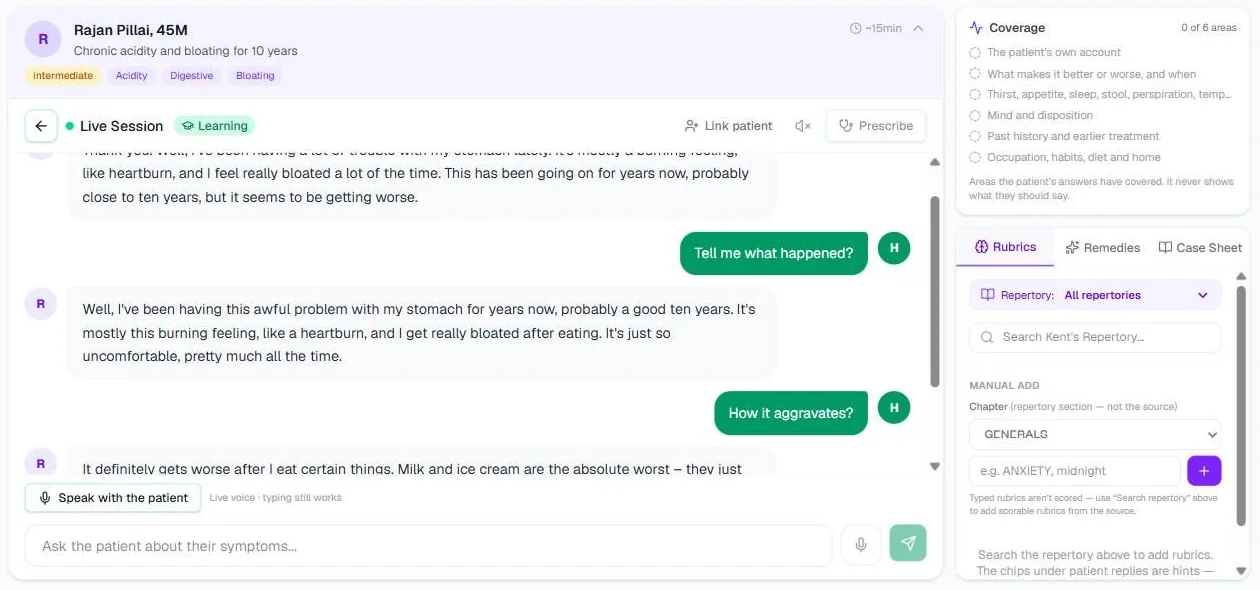
A case in Learning mode on our own account, 13 September 2026. It was started in June, before the meter existed, so it shows 0 of 6 areas.
Your profile, Practise next and Mastered
The Cases page now shows Your case-taking profile: what you draw out in each area across your scored library cases, weakest first. Practise next suggests the case that leans hardest on your weakest area. A case is mastered at 80% of its case-taking points in two attempts in a row, and library cards show Mastered or Last n%.
Random and follow-up cases
Random / Free Case used to invent a patient on the spot, which is why illnesses drifted. It now gives you a ready-made case from a saved pool, each with its own answer key drafted from public-domain materia medica, every fact quoted from its source. A case joins the pool only after automatic checks pass, so random cases can now be scored and broken down like library cases.
We can also build second-visit cases. They open with a line such as "Follow-up visit. Previous prescription: … 30C, 5 weeks ago. Find out what changed since." The patient never names the medicine, and a prescription inimical to the previous one is called out in the breakdown. Follow-up cases join the library as reviewers sign them.
Voice and languages
Press Speak with the patient to hold the consultation aloud; the patient replies in speech, and typing still works. Before a spoken case is scored, Check what the microphone heard lets you correct your own lines (not the patient's), so the grade rests on what you actually asked.
Choose the language under Language in Start a Case: English, Hindi, Marathi, Tamil, Telugu, Kannada, Bengali or Gujarati. It now stays fixed for the whole case. Outside English you get full feedback marked Feedback · unscored, with no number, until scoring in that language has been checked against faculty marking.
Exam mode is now an OSCE station
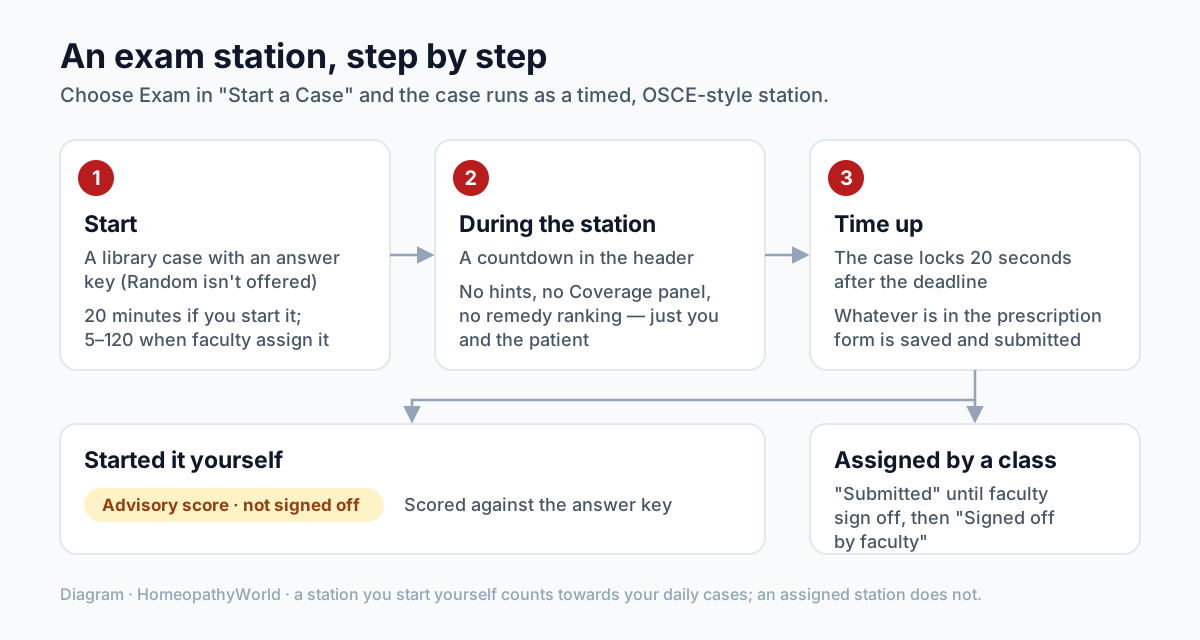
Diagram: an exam station from start to result.
Choosing Exam in Start a Case runs an OSCE station: 20 minutes timed by the server, no coverage meter, no symptom hints and no remedy ranking. At Time up, whatever you have saved is marked. The result is scored against the answer key and labelled Advisory score · not signed off. Random cases are not offered here, because a station needs a library case with an answer key.
Classes and the case journal
Colleges can now run classes. We set up the class and name its faculty, who assign cases as practice or as timed stations (5 to 120 minutes) with open and due dates. Students join from the Cases page with the Class code and Join, and are told first what faculty will see. For an assigned station you see Submitted until faculty sign off; then your result reads Signed off by faculty, with their reason if they changed the AI's score. If you leave a class, its faculty can no longer open your attempts.
The new Case journal on the Cases page lets you pick up to 10 acute and 10 chronic completed library cases and open a Printable journal. Each record holds the patient, the case taking as it happened, your rubrics and prescription, the result you were shown, and signature lines for you and your faculty.
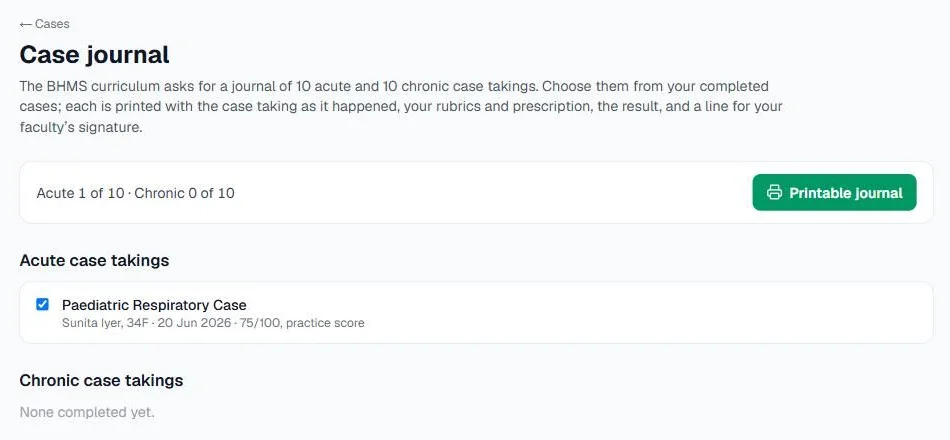
Screenshot of the case journal on our own account, 13 September 2026.
Your data
Settings → Privacy has a new choice, off by default: "Let reviewers use my completed cases to check the scorer". If you allow it, a case may be copied without your name into the set used to test the scorer, kept for at most two years, and deleted if you withdraw. For now no student cases are being copied at all, and that stays off until the terms have had a final review.
Smaller fixes
- Words no longer run together on a few pages, including the Privacy Policy.
- Review chat and Join were invisible on devices set to dark mode; they are readable again.
- A station that ran out of time reads "Completed without a prescription" in your list, not "Not completed".
- Rubric search in the simulator shows the full rubric path, so sibling rubrics no longer look identical.
The repertory: what changed
No more confidence percentage
The large "87% · Excellent" figure read like the chance of being right, which no repertory can give you. Remedy cards now show coverage ("Covers 3/4 rubrics (75%)") and grade sum, with a bar relative to the leading remedy. When remedies tie, the summary names them rather than quietly picking one, and the page reminds you that a repertorisation is an index, not a prescription.
Honest counts, and a repaired Stomach chapter
Search used to show a stored remedy count that was sometimes wrong: "Stomach, nausea" was listed with 338 remedies and held none. Search now shows the true count, labels an empty rubric "no remedies", and will not add one to your basket. Results rank by relevance rather than size, and multi-word searches such as "anxiety night" now work.
The empty rubrics came from a damaged import. We restored 2,494 gradings across 303 rubrics in Kent's Stomach chapter; "Stomach, nausea" now holds 335 remedies and gives Ipecacuanha at grade 3.
The grid is the default view
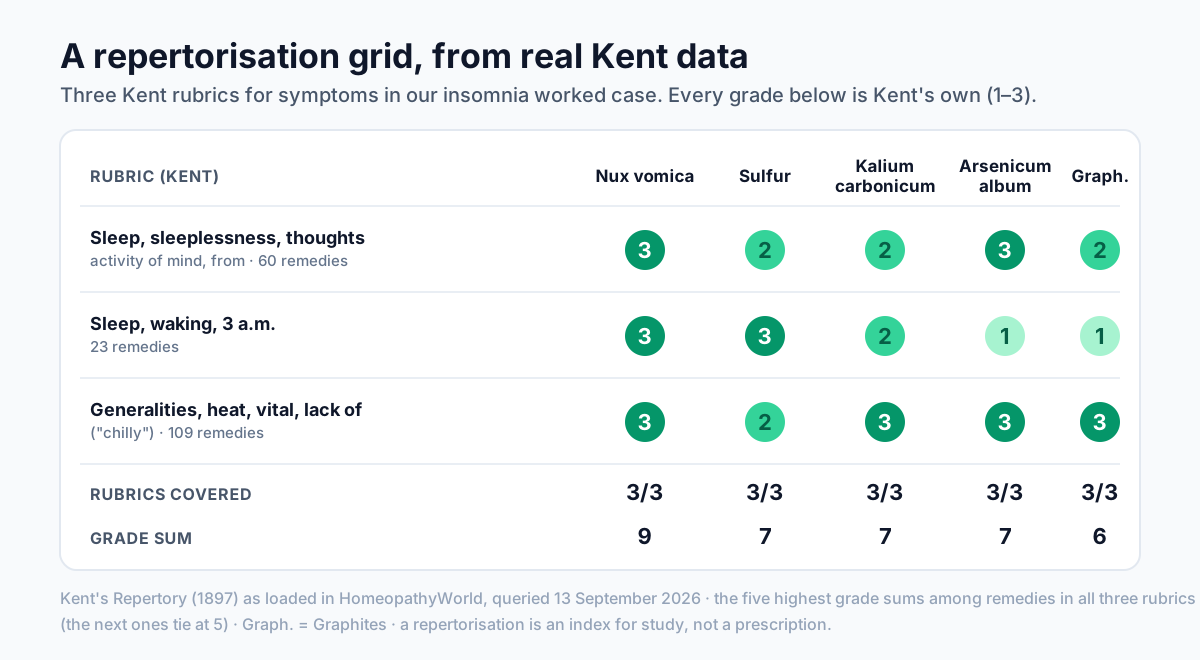
Diagram built from real Kent's Repertory grades: three rubrics from our insomnia worked case, and the five remedies with the highest grade sums among those in all three.
Analysis now opens on a rubric-by-remedy grid. A ranked list gives a total; the grid shows where it came from, with empty cells drawn as gaps, because what the leading remedy does not cover is often the most useful thing on the screen. Cards are one toggle away, and a Degrees / Symptoms toggle orders both by sum of degrees or sum of symptoms. When the two readings name different leaders, a note tells you to check both.
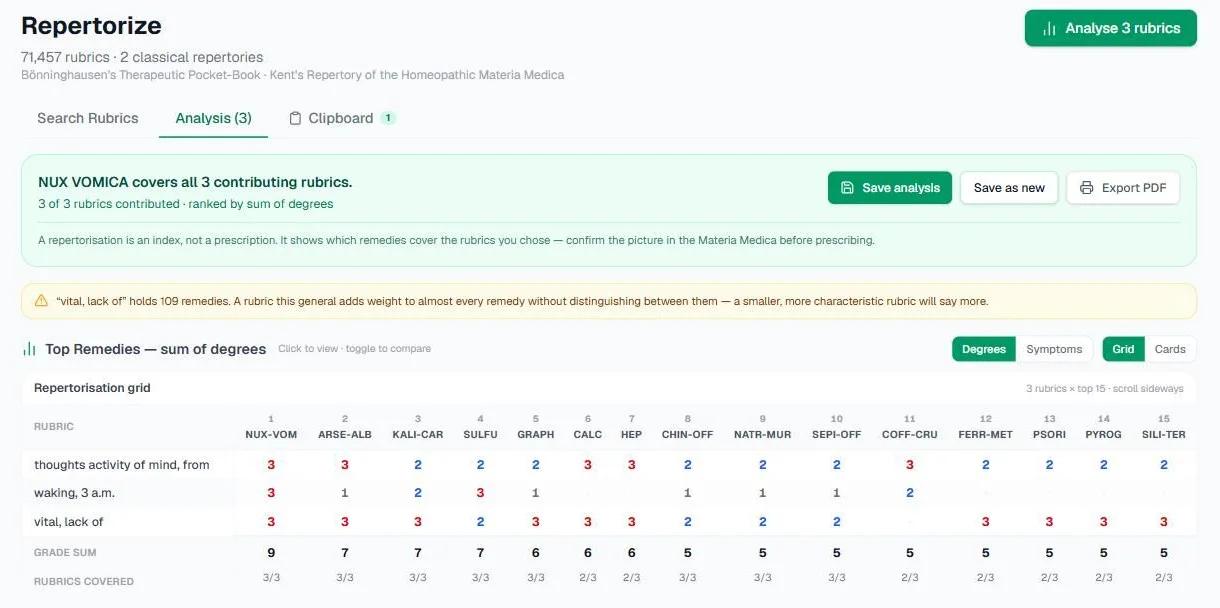
The same three rubrics in the app, 13 September 2026: the leaders match the diagram, and the amber note above the grid warns that "vital, lack of" is a very large rubric.
Warnings about the basket
Above the ranking, the analysis now warns when the basket itself is weak: fewer than three rubrics can contribute; a rubric holds 100 or more remedies; a rubric sits inside its own parent, so one symptom counts twice; two rubrics carry nearly the same remedies; the basket holds both sides of one modality; every rubric comes from one chapter; or the two repertories are mixed (scores are normalised so a top grade counts the same in each). Nothing is removed automatically. You decide what belongs in the case.
Bönninghausen polarity
For the Therapeutic Pocket-Book, the grid adds a Polarity row when your basket holds opposed pairs, such as aggravation and amelioration from the same circumstance. An asterisk marks a remedy also graded on the opposite side, and a separate mark flags Frei's contra-indication. Polarity is shown, never used to drop a remedy; where the source grades every remedy in a pair alike, it is withheld and the grid says so.
Relationships, and the rest
- The Relationships tab had never shown anything. It now lists 204 relationships (complementary remedies, antidotes, remedies that follow well, and inimicals) from Boericke's relationship sections. Names that could not be matched to exactly one remedy were left out rather than guessed.
- The module now works on a phone.
- 176 duplicate remedy entries were merged, so gradings for remedies such as Nux vomica and Lycopodium now sit with their Materia Medica text.
- Saved analyses on the Clipboard say when they were computed, because a saved result is a snapshot.
- In a patient's consultation, Repertorisation behind this prescription links the analysis you worked from, and Prescribe from its ranking fills in the remedy with one tap. At follow-up, Outcome of this prescription records Improved, Partly improved, No change or Worse. It stays in the patient's record and never goes to usage statistics.
What is still in progress
Some of this depends on people, and we would rather say so plainly:
- Answer keys are unsigned drafts. All 10 library cases have keys, and each stays labelled an unsigned draft until two homeopath reviewers sign it. The breakdown tells you when this applies.
- Scores are practice scores. The card reads Practice score: a learning aid, not an official grade, until the new scorer agrees with faculty marking at least as well as two faculty agree with each other.
- Languages other than English are unscored until each has its own faculty-marked check.
- Reviewers and the first college class are still being arranged, so disputes and faculty sign-off will be slow at first.
Where to go next
The tutorial series covers each feature step by step:
- Your first case in the AI case simulator
- Understanding your case score
- Exam mode, OSCE stations and the case journal
- Voice and languages in the case simulator
- Running a class on HomeopathyWorld
- Repertorisation, step by step
Or go straight to the tools: open the case simulator or open the repertory.
Dr. Harish Kumar
Homeopath and founder of HomeopathyWorld. Writes on materia medica, case-taking, repertory and the Organon for students and practitioners.
Put this into practice
Repertorise these symptoms against the real Kent & Bönninghausen, read the full Materia Medica, and practise the case on an AI patient — free account, no card required.
Create your free accountMore in What’s new
Discussion
Sign in to join the discussion.
No comments yet — start the conversation.